
If your Google Local Services Ads produce steady calls for the first two weeks and then go nearly silent, the most likely cause is budget pacing, not seasonality, not broken tracking. The monthly budget gets consumed by early-month leads, leaves almost nothing for the final third of the month, and the gap repeats on the same schedule every single month.
- In one South Florida moving company’s LSA account, nearly all leads arrived in the first third of the month; the final third was close to zero — and the pattern repeated across four consecutive months.
- Search and Performance Max campaigns in the same account paced evenly all month, which ruled out seasonality and tracking failures as causes.
- Local Services Ads bill per lead, not per click, and in this account the budget did not spread like a click-based Search budget — it front-loaded.
- The fix is a business decision: raise the LSA budget, shift budget toward the back half of the month, move spend into Search or Performance Max, or leave it as is.
- Before changing anything, split each month into thirds across at least three months. The pattern in your data will tell you which channel is the problem.
The Complaint: Calls Stop at the End of Every Month
A South Florida moving company came to us with a specific problem: calls would roll in through mid-month and then dry up. The owner assumed it was slow season, or a tracking glitch, or just the way things went. The complaint was consistent enough that we pulled the actual lead data to find out.
The account was running three campaign types at the same time: Google Local Services Ads, a standard Search campaign, and Performance Max. That setup mattered. Having three channels running in parallel meant we could compare their behavior directly instead of guessing. For more on how local map-pack visibility interacts with paid campaigns, our local SEO services page explains how organic and paid presence reinforce each other.
Why We Suspected Budget Pacing, Not Seasonality or Tracking
Seasonality in moving is real. Demand does fluctuate. But a true seasonal dip does not hit on a schedule that lines up with the calendar month — it shows up in the demand data across all channels at once. If Search and Performance Max stay busy while LSA goes quiet, that is not a market problem. That is a channel-specific problem.
Tracking failures were also on the list. A broken call-tracking number can make leads disappear from reports without actually disappearing from the phone. But a tracking break tends to be random or tied to a configuration change, not perfectly synchronized with the billing month.
The more likely explanation was budget pacing. LSA is a pay-per-lead product. Google’s Local Services Ads documentation describes the product’s billing model as cost-per-lead rather than cost-per-click. The practical question was whether the monthly budget was being consumed faster than the month was passing — and whether we could prove it.
What follows describes what we observed in one specific account. We are not stating how Google programs LSA budget pacing in general; Google’s help page on Local Services Ads budgets is the authority on that, and it says that once you hit your monthly max, your ad stops appearing for the rest of the month unless you adjust your budget. We are reporting the pattern we measured and what it meant for this client’s decisions.
What the Lead Data Showed: Four Months Split Into Thirds
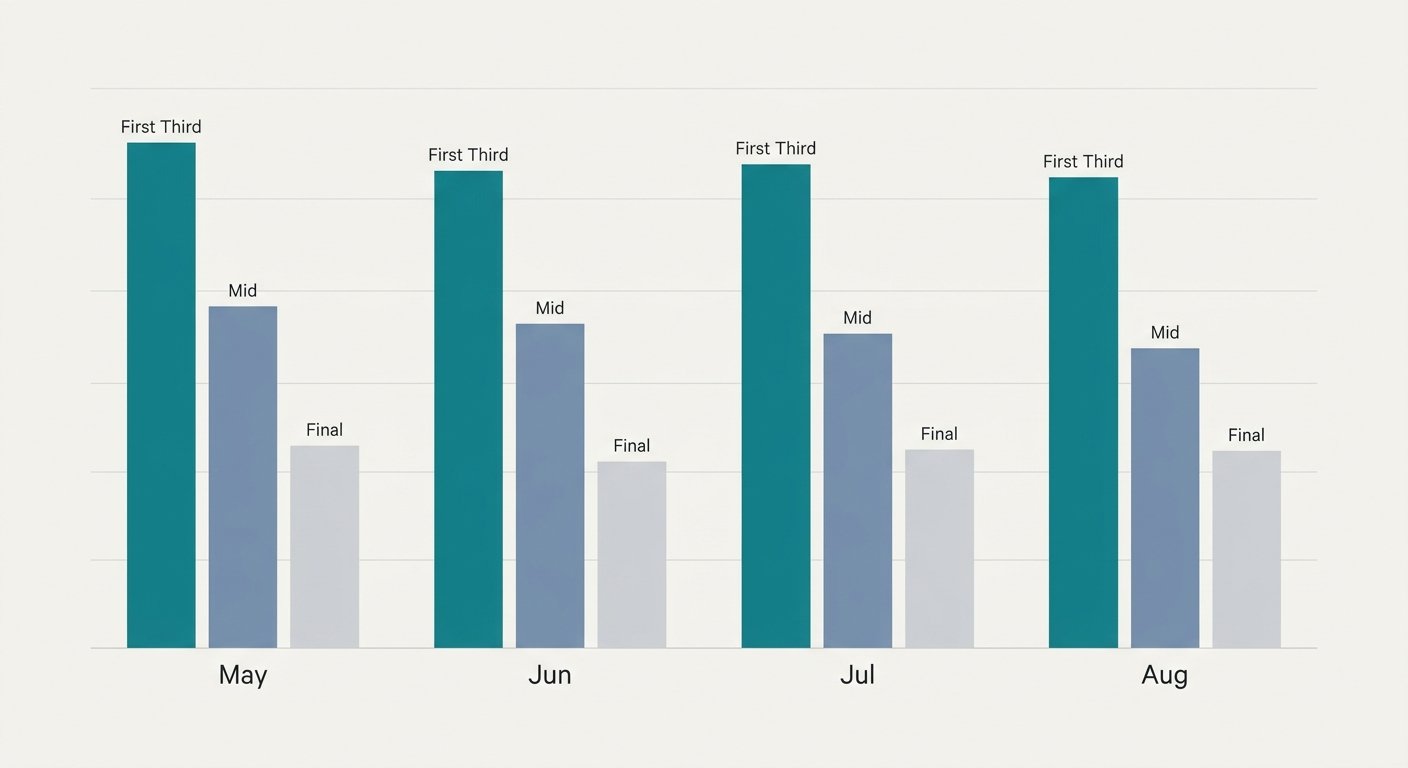
We pulled LSA lead counts for four consecutive months — May through August — and divided each month into three equal periods: days 1–10, days 11–20, and days 21 to month end. The pattern was consistent and hard to argue with.
In every month, the first third of the month produced the most leads by a wide margin. The middle third produced significantly fewer. The final third produced almost nothing — in one month, it produced exactly zero leads. This was not an isolated bad month. It repeated with minor variation across all four months we reviewed.
Spend data confirmed the same shape. LSA spend was heavy in the first ten days, dropped meaningfully in the middle, and fell off sharply in the final third. The budget was not evenly distributed. It was front-loaded.
The pattern repeated across four consecutive months. That ruled out coincidence and pointed directly at the budget.
Why Local Services Ads Pace Differently From Search
Standard Search campaigns let you set a daily budget, and Google distributes spend across the calendar month with some variance day to day. The mechanism is built around click volume, which is relatively continuous. LSA works differently — leads arrive in discrete events, each one consuming a chunk of the monthly budget in a single transaction.
When leads are available early in the month, the LSA budget absorbs them. If that early demand is high enough, the budget can be largely depleted before the month ends. Calls don’t stop because demand stopped. They stop because the account has run out of room for new leads.
This distinction matters for how you diagnose the problem. Most advice about Google Ads budget pacing assumes click-based campaigns, where daily budgets smooth out naturally. The pay-per-lead model in LSA does not automatically self-pace the same way — at least not in this account. Business owners comparing Google Ads for service calls can see how we run click-based Search campaigns on our Google Ads management page.
How Search and Performance Max Behaved in the Same Months
This is the detail that made the analysis conclusive. Search and Performance Max spend stayed even across the same four months. There was no late-month drop. Both campaigns continued to generate activity through the final third of each month without interruption.
If the problem were seasonal — if moving demand genuinely fell off at month end — you would expect all three channels to reflect that. They did not. Only LSA showed the cliff. That made budget pacing the only explanation that fit all the data at once.
If your Search and Performance Max campaigns stay active late in the month while LSA goes quiet, you are almost certainly looking at a budget pacing issue, not a demand issue. The comparison between channels is the fastest way to confirm it.
Your Options: Raise, Shift, Move, or Leave the Budget
Once we confirmed the cause, the conversation became a business decision rather than a technical repair. We laid out four options for the client.
| Option | What it does | Trade-off |
|---|---|---|
| Raise the LSA budget | Extends budget further into the month | Higher monthly spend; works only if the LSA leads convert well |
| Shift budget to the back half | Pauses or reduces LSA early in the month to preserve budget | Loses some early leads; requires active monitoring |
| Move marginal budget to Search or PMax | Keeps late-month activity in channels that pace evenly | Different lead quality or cost per lead; test before committing |
| Leave it as is | No change required | Late-month silence continues; acceptable only if the ROI on early leads is strong enough |
The right answer depends on cost per lead and cost per booked job across channels — numbers only the business owner can weigh. We built a one-page explainer so the owner could see the monthly pattern and make that call with real data in front of them.
How to Check Your Own Local Services Ads for the Same Pattern
Export LSA lead data for at least three months
Pull lead counts by date from your LSA dashboard or account reports. Three months is the minimum to tell a pattern from noise; four is better.
Split each month into thirds
Group by days 1–10, 11–20, and 21 to month end. Count leads in each period. A consistent late-month drop is the signal you are looking for.
Compare against other active channels
If Search or Performance Max stayed even while LSA dropped, pacing is the cause. If all channels dropped together, look at demand or tracking.
Check your call tracking setup independently
Verify that calls arriving late in the month are actually being tracked. A quick test call in the final week of a month can confirm tracking is live before you blame budget.
Make a budget decision based on cost per booked job
Compare what each channel costs per lead and per converted job, then decide whether to raise, shift, or redirect spend — not based on which channel feels busiest, but which one earns.
The Google Local Services Ads Help Center explains how to access your lead history and dispute invalid leads, which is worth reviewing as part of any audit.
Frequently Asked Questions
Why do my Local Services Ads stop getting leads at the end of the month?
In the account we studied, the cause was budget depletion. LSA bills per lead rather than per click, so when early-month leads are plentiful, the monthly budget can be consumed before the month ends. Leads thin out in the final third even when market demand is still present.
Are Local Services Ads paced like regular Google Search campaigns?
In the account we analyzed, they were not. Search and Performance Max spend stayed even across the month, while LSA spend was heavily front-loaded. The pay-per-lead billing model means each lead event draws directly against the monthly cap rather than distributing spend gradually the way a daily click budget does.
How do I know if it’s budget pacing or a seasonal dip?
Split each month into thirds across at least three months. If the same late-month drop repeats consistently and your other campaigns stay even through the same period, seasonality is an unlikely explanation. A true seasonal dip would affect all channels at the same time.
How do I rule out broken call tracking for Local Services Ads?
If early-month leads are tracked normally and only the late-month leads vanish on a repeating schedule, tracking is an unlikely cause. That said, run a manual test call in the final week of a month before concluding anything — a misconfigured tracking number can mimic a budget issue in the reports.
Should I raise my Local Services Ads budget or move it to Search?
That is a business decision, not a technical one. Compare cost per lead and cost per booked job across your active channels, then decide where the marginal dollar earns the most. Some accounts perform better keeping LSA active and raising the cap; others get better late-month coverage by shifting to Search or Performance Max.
Next Step: Google Ads Management That Shows Its Work
The analysis above is the kind of work that comes standard when UltraWeb Labs manages your Google Ads. We pulled four months of lead data, split it into thirds, compared it across three campaign types, built a one-page explainer for the owner, and turned a vague complaint into a clear business decision. No agency-speak. No guessing. Our co-founder, Damon Delcoro, co-runs Security Camera King, a $25M+ a year online store — so when we talk about where to put marginal ad budget, it is not theoretical.
Google Ads management starts at $600 per month plus ad spend, with no long-term contract — cancel after the first month if it is not working. We also offer a free strategy call with no pitch deck and no obligation. If you want to see what your LSA lead data actually shows, we can audit it and report back. Visit our local service business page to see how we approach campaigns for lead-gen businesses, or browse our case studies for a look at how we document results.
Calls drying up at month end?
Request an LSA audit and we will check your pacing and lead data — no obligation, no pitch deck, just the numbers.

Skyler Libkie
Skyler Libkie joined UltraWeb Labs in 2022 and leads web design and SEO for the agency, building and ranking websites for South Florida businesses. UltraWeb Labs is an engineering-led web design and SEO agency in Boca Raton. Our co-founder, Damon Delcoro, co-runs Security Camera King, a $25M+ a year online store. More about Skyler →